i3X Quick Start
i3X is the Industrial Information Interoperability eXchange API, a vendor-agnostic REST API specification for accessing contextualized manufacturing data. If you're unfamiliar with i3X, please visit www.i3x.dev for more information.
Note: This Guide has been updated for the v1.0 Release
The Basics
i3X is an API, it does not provide a data platform or wire protocol. Rather, its functions are bound to (wrapped around) one or more existing platforms, normalizing the interface across heterogeneous architectures. Multiple back-end data sources can be coordinated, provided their data model is unified, to fulfill the interface.
Key Concepts
| Concept | Description |
|---|---|
| Namespace | Logical scope grouping related types (identified by URI); instances are not namespace-scoped |
| ObjectType | Schema definition for a class of objects (machines, sensors, orders) |
| Object | An instance with attributes, values, and hierarchical organization |
| RelationshipType | Connection definition between objects (HasParent, HasComponent, custom) |
| ElementId | Unique string identifier for any element in the address space |
| VQT | Value-Quality-Timestamp structure for data values |
Namespace (URI)
└── ObjectType (schema)
    └── Object (instance)
        ├── Attributes (metadata: DisplayName, ParentId, TypeElementId)
        └── Values (VQT: value, quality, timestamp)
            └── Child Objects (composition, controllable via maxDepth)
API Operations
Info — Server discovery
GET /info— Server version, capabilities, and health check (no auth required)
Explore — Discover the data model
GET /namespaces— List available namespacesGET /objecttypes— Get type schemas (filterable by namespace)POST /objecttypes/query— Bulk fetch object types by ElementIdGET /relationshiptypes— List relationship types (filterable by namespace)POST /relationshiptypes/query— Bulk fetch relationship types by ElementIdGET /objects— List instances (filterable by TypeId or root status)POST /objects/list— Bulk fetch objects by ElementIdPOST /objects/related— Traverse relationships between objects
Query — Read current and historical data
POST /objects/value— Get last known values (with optional depth for composition)POST /objects/history— Retrieve time-series data within a range
Update — Write data back to the platform
PUT /objects/value— Update current values (bulk, withupdatesarray)PUT /objects/history— Modify historical records (bulk, withupdatesarray)
Subscribe — Real-time data streaming
POST /subscriptions— Create a subscription (requiresclientId)POST /subscriptions/register— Add objects to monitorPOST /subscriptions/unregister— Remove monitored objectsPOST /subscriptions/sync— Pull queued updates with sequence acknowledgmentPOST /subscriptions/stream— Server-Sent Events for live updates (optional)POST /subscriptions/list— Retrieve subscription detailsPOST /subscriptions/delete— Remove subscriptions
Relationships
Understanding relationships is key to understanding i3X. The API requires Hierarchical relationships, recommends Composition relationships, and offers a third, optional kind if supported by the underlying platform.
- Hierarchical — An organizational parent/child relationship of objects (eg: Plant > Area > Line)
- Composition — How a complex object is constructed of component parts, each part having its own ObjectType (indicated with
isComposition) - Graph — Any relationship other than the previous two (eg: CanFeed, MonitoredBy)
For further exploration of relationships, please see Understanding Relationships.
Step 1: View the API
Explore the API in action with Demo data at the public endpoint: https://api.i3x.dev/v1/docs
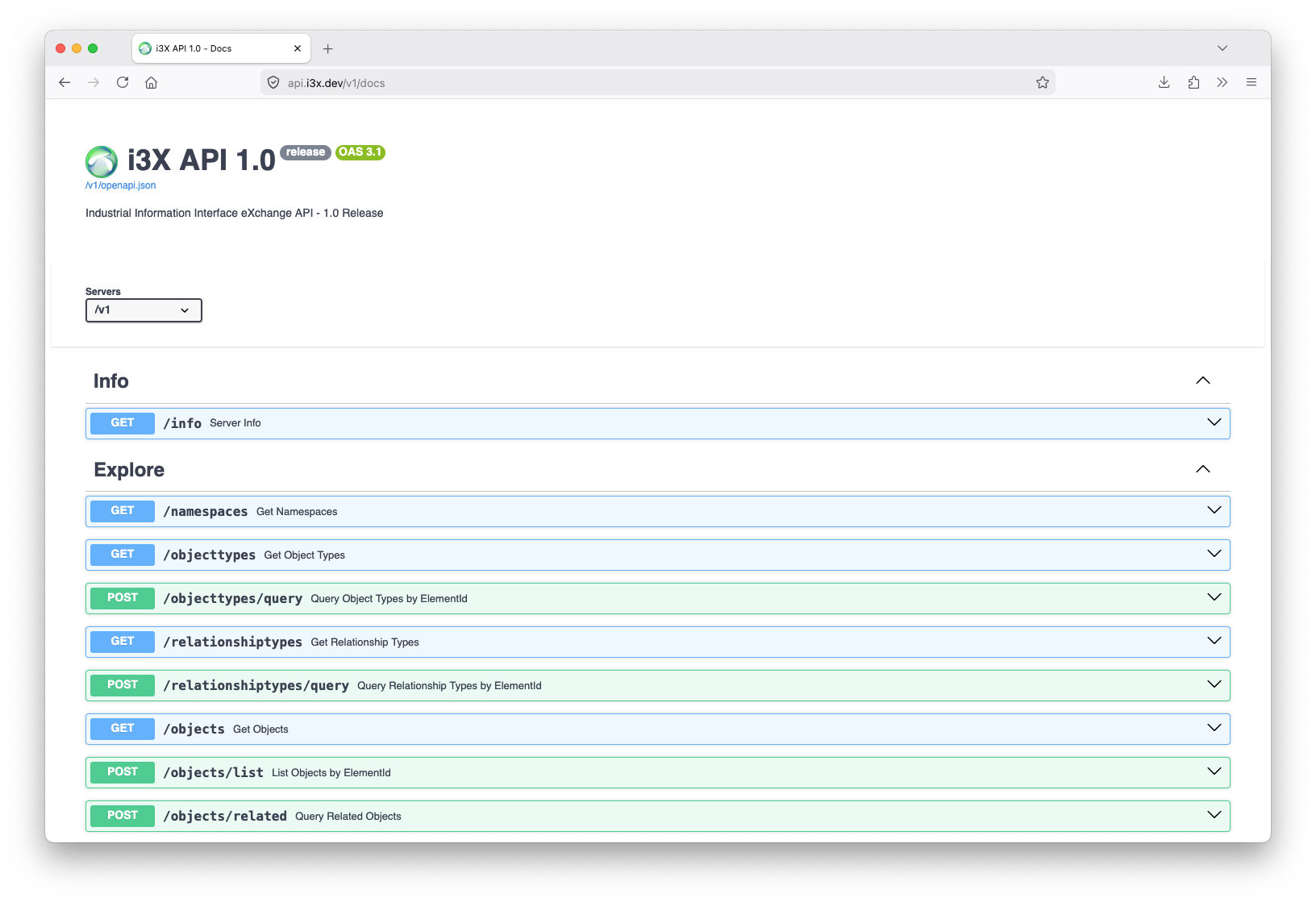 For example:
- Try using the
namespacesendpoint to discover what Namespaces are present in the server. - Use the
objectsendpoint to discover what Objects are present. - Pick an object, by elementId, and use the
relatedendpoint to find relationships with other objects.
Step 2: Visualize the Model
Download i3X Explorer
i3X Explorer is a free client that works with any compliant i3X implementation, although features may vary depending on back-end implementation.
- Visit https://acetechnologies.net/i3X/
- Click the Downloads button
- From the most recent release, choose a deployment package suitable for your platform (Mac, Windows or Linux)
Launch i3X Explorer
- Open i3X Explorer from your Start Menu, Dock or Launcher
- Connect to the Demo endpoint at https://api.i3x.dev/v1
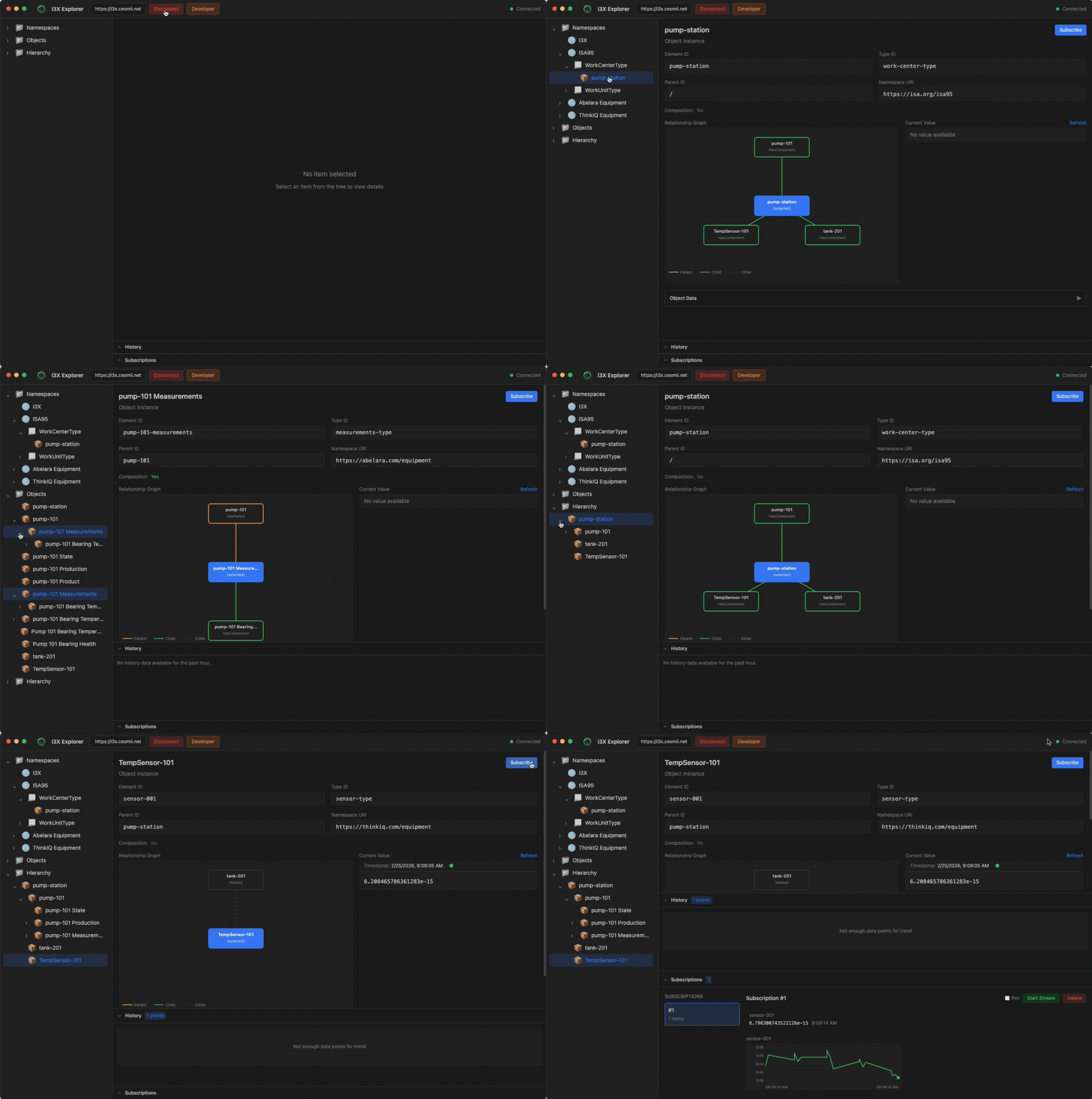
Explore the Address Space
- Expand the Namespaces tree in the left panel. Expand a Namespace and note the Types that are present. Expand a Type and note the Instance Objects.
- Expand the Objects tree in the left panel. Note the simple Objects. Expand a complex Object, such as pump-101 to see its Component Types.
- Expand the Hierarchy in the left panel. Note how the objects are organized.
- Select TempSensor-101, note the current value.
- Click the Subscribe button at the top right. Click Start Stream to see the values updating in real-time.
Step 3: Create a Server
This step requires Python 3, and will use the sample MQTT adapter included in the Demo. You can use your own MQTT broker, or the sample Broker provided by CESMII.
Download the Repo
- Clone the i3X repo:
git clone https://github.com/cesmii/i3X.git
Configure the Server
- Change directory to the Demo server project:
cd i3X/demo/server - Copy the MQTT config file into place as the default config:
cp config-mqtt.json config.json - Optional: edit
config.jsonto point to your own MQTT broker if you prefer
Start the Server
The startup script creates a virtual environment and installs pre-requisites on most platforms:
- Mac/Linux/WSL:
./setup.sh - Windows PowerShell:
./setup.ps1
Connect with i3X Explorer
- Disconnect i3X Explorer from the public endpoint
- Connect i3X Explorer to your newly created local endpoint:
http://localhost:8080 - Explore the Namespaces and Address Space provided by the MQTT Adapter
Step 4: Create Your Own Client
This setup requires Python 3, and will use the i3x-client library available in pip. Modern best practices require using a virtual environment, but we'll bypass that for simplicity.
Examples shown should work on Mac, Linux, WSL and Windows PowerShell. Windows command line users will need to modify paths.
- Create a folder for your new project:
mkdir ~/my-i3x-client - Change directory to your new folder:
cd ~/my-i3x-client - Install the i3x-client library:
pip3 install i3x-client --upgrade --break-system-packages - Create a new file to contain your script:
- Mac/Linux/WSL:
nano main.py - Windows:
notepad main.py
- Mac/Linux/WSL:
Copy/Paste this code block into your text editor:
import i3x
with i3x.Client("https://api.i3x.dev/v1") as client:
    # Get server info
    info = client.get_info()
    print(info.spec_version, info.capabilities)
    print()

    # Get namespaces
    namespaces = client.get_namespaces()
    print(namespaces)
    print()

    # Get objects
    objects = client.get_objects(root=True)
    print(objects)
    print()

    # Read a value
    val = client.get_value("sensor-001")
    print(val.value, val.quality)
    print()

    # Subscribe and stream
    client.on_value_change = lambda c, vc: print(f"sensor-001: {vc.value}")
    sub = client.subscribe(["sensor-001"])
    import time; time.sleep(5)  # watch for changes
- Save and exit, returning to the command line
- Type:
python3 main.pyand hit enter to run your program!
Learning More
Server and Client Developers can find specific documentation in the appropriate sections on this site.
All of the projects used in this Quick Start are open and open source. For example:
- i3X Explorer has a Developer Tools button that allows you to observe all network request and responses between the client and the server. You can view the source of the client itself at https://github.com/ace-technologies-inc/i3X-Explorer.
- The i3x-client Python library has more guidance on the PyPi project page, or you can view the source code at https://github.com/cesmii/python-i3x-client.
- The Demo server and MQTT adapter are a part of the i3X Working Group project. The source code, documents and project details are at https://github.com/cesmii/i3x.